
• About Todd
  • Best of the Blog
  • Memes
  • Reading List
  • Todd’s Publications

toddjasper

~ Amat victoria curam

toddjasper

Monthly Archives: August 2012

Chevy Chase Patch: What You Need to Know About West Nile Virus

31 Friday Aug 2012

Posted by toddjasper in EMERGENCY MANAGEMENT

≈ Leave a comment


Every month I have an emergency preparedness article in the local newspaper (ChevyChase.Patch.com). Here’s the link to my August article. I’ve also copied it below:

Although most people infected with the virus never know it, West Nile Virus can potentially be life threatening. This week, Maryland suffered its first fatality from the virus.


The virus is spread by mosquitoes that first bite infected birds, then bite a human–which  spreads the West Nile Virus to humans. According to the Mayo Clinic, symptoms can resemble influenza (typical symptoms include high fever, rash, vomiting, and body aches). However, signs of severe West Nile Virus infection include severe headache, stiff neck, disorientation, tremors, or lack of coordination and partial paralysis. Any signs of severe infection require immediate medical attention.


This year, the Washington Post reports, officials say that “an early spring and hot summer” led to a particularly high number of mosquitoes, which has led to increased numbers of infections. For a map of current infection rates, the US Geological Survey (USGS) maintains a website of reported WNV infections in Maryland.


As Montgomery County’s Department of Health and Human Services outreach materials explain, the best way to prevent WNV is to eliminate breeding grounds/conditions of mosquitoes. To reduce mosquitoes:


  • Eliminate standing water (such as in discarded tires, buckets, garbage can lids, wheelbarrows, and wading pools)
  • Clean roof gutters to remove standing water
  • Ensure that tarps and other surfaces that may trap water are able to drain water rather than collect moisture


To protect yourself and your family, the following preventative measures can help:


  • Limit outdoor activities from dawn to dusk (when mosquitoes are most likely to be active)
  • Use screens on all open windows and doors; repair tears as necessary
  • Wear light-colored, loose-fitting, long-sleeved shirts and long pants
  • Use insect repellant when outdoors (make sure to spray clothes with repellant before dressing)
  • Never handle dead birds (as if that wasn’t self-explanatory to begin with)–call 311 if you need to dispose of a dead bird


There is currently no vaccine or treatment for WNV and the virus has shown a greater impact on individuals with compromised immune systems, infants, the elderly, and pregnant women. The protective and preventative measures mentioned above are crucial in the fight to stop the spread of WNV. Please do your part and contain the spread of West Nile Virus by eliminating standing water and spraying insecticides around your property to prevent mosquitoes from reproducing. It just might save a life.


Todd Jasper is a federal emergency manager and has been happy to call Chevy Chase home since 2008. His emergency management blog is www.toddjasper.com.
Share this:

  • Email a link to a friend (Opens in new window) Email
  • Share on X (Opens in new window) X
  • Share on Facebook (Opens in new window) Facebook
  • Share on Pinterest (Opens in new window) Pinterest
  • Share on Reddit (Opens in new window) Reddit
Like Loading...

IAEM Bulletin: Emerging Tech School of Hard Knocks

08 Wednesday Aug 2012

Posted by toddjasper in EMERGENCY MANAGEMENT

≈ Leave a comment

An Excerpt from the August 2012 Bulletin of the
International Association of Emergency Managers (IAEM)

Here’s a plain text version as well:

Emerging Tech School of Hard Knocks

By Todd J. Jasper

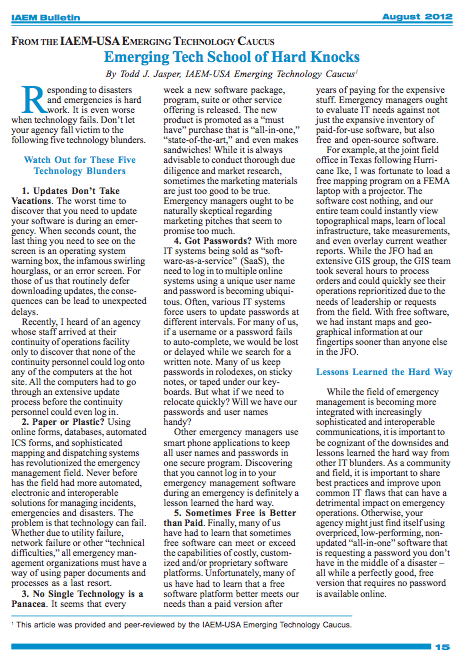
Responding to disasters and emergencies is hard work. It is even worse when technology fails. Don’t let your agency fall victim to the following five technology blunders.

1. Updates Don’t Take Vacations…

The worst time to discover that you need to update your software is during an emergency. When seconds count, the last thing you need to see on the screen is an operating system warning box, the infamous swirling hourglass, or an error screen. For those of us that routinely defer downloading updates, the consequences can be lead to unexpected delays.

Recently, I heard of an agency that arrived at their continuity of operations facility only to discover that none of the continuity personnel could log onto any of the computers at the hot site. All the computers had to go through an extensive update process before the continuity personnel could even log in!

2. Paper or Plastic?

Using online forms, databases, automated ICS forms, and sophisticated mapping and dispatching systems has revolutionized the emergency management field. Never before has the field had more automated, electronic, and interoperable solutions for managing incidents, emergencies, and disasters. The problem is that technology can fail. Whether due to utility failure, network failure, or other “technical difficulties”, all emergency management organizations must have a way of using paper documents and processes as a last resort.

3. No Single Technology is a Panacea

It seems that every week a new software package, program, suite, or other service offering is released and it is a “must have”, “all-in-one”, “state-of-the-art”, and even makes sandwiches! While it is always advisable to conduct thorough due diligence and market research, sometimes the marketing materials are just too good to be true.  Emergency managers ought to be naturally skeptical regarding marketing pitches that seem to promise too much.

4. Got Passwords?

With more IT systems being sold as “software-as-a-service” (SaaS), the need to log-in to multiple online systems using a unique username and password is becoming ubiquitous. Oftentimes, various IT systems force users to update passwords at different intervals. For many of us, if a username or a password fails to auto-complete, we would be lost or delayed while we search for a written note. Many of us keep passwords in rolodexes, sticky notes, or taped under our keyboards. But what if we need to relocate quickly? Will we have our passwords and usernames handy?

Other emergency managers use smart phone applications to keep all usernames and passwords in one secure program. Discovering that you cannot log into your emergency management software during an emergency is definitely a lesson learned the hard way.

5. Sometimes Free is Better than Paid

Finally, many of us have had to learn that sometimes free software can meet or exceed the capabilities of costly, customized, and/or proprietary software platforms. Unfortunately, many of us have had to learn that a free software platform better meets our needs than a paid version after years of paying for the expensive stuff. Emergency managers ought to evaluate IT needs against not just the expansive inventory of paid-for-use software, but also free and open-source software.

For example, at the joint field office in Texas following Hurricane Ike, I was fortunate to load a free mapping program on a FEMA laptop with a projector. The software cost nothing and our entire team could instantly view topographical maps, learn of local infrastructure, take measurements, and even overlay current weather reports. While the JFO had an extensive GIS group, the GIS team took several hours to process orders and could quickly see their operations re-prioritized due to the needs of leadership or requests from the field. With free software, we had instant maps and geographical information at our fingertips sooner than anyone else in the JFO.

Lessons Learned the Hard Way

While the field of emergency management is becoming more integrated with increasingly sophisticated and interoperable communications, it is important to be cognizant of the downsides and lessons learned the hard way from other IT blunders. As a community and field, it is important to share best practices and improve upon common IT flaws that can have a detrimental impact on emergency operations. Otherwise, your agency might just find itself using overpriced, low-performing, non-updated “all-in-one” software that is requesting a password you don’t have in the middle of a disaster–all the while a perfectly good, free version that requires no password is available online.

Share this:

  • Email a link to a friend (Opens in new window) Email
  • Share on X (Opens in new window) X
  • Share on Facebook (Opens in new window) Facebook
  • Share on Pinterest (Opens in new window) Pinterest
  • Share on Reddit (Opens in new window) Reddit
Like Loading...

Enter your email address to follow this blog and receive notifications of new posts by email.

Join 49 other subscribers

Recent Posts

  • Todd’s Interview: “Questions Raised about Police Response in Capitol Shooting”
  • Todd’s NPR Interview on Tragic Navy Yard Mass Shooting
  • 5 Reasons Your Agency Should Have a Smartphone App
  • FEMA Releases Revised Federal Continuity Directive 2 (FCD-2)
  • Intro to IAEM Emerging Technologies Caucus (ETC)

Todd’s Tweets

Tweets by toddjasper

Categories

  • #SMEM
  • ABOUT TODD
  • CAMPUS SAFETY, SECURITY, & PREPAREDNESS
  • CONTINUITY OF OPERATIONS
  • EMERGENCY MANAGEMENT
  • EMERGENCY NOTIFICATION
  • HOMELAND SECURITY
  • PREPAREDNESS
  • PUBLIC HEALTH
  • RECOVERY
  • RESPONSE

Blog at WordPress.com.

  • Subscribe Subscribed
    • toddjasper
    • Join 49 other subscribers
    • Already have a WordPress.com account? Log in now.
    • toddjasper
    • Subscribe Subscribed
    • Sign up
    • Log in
    • Report this content
    • View site in Reader
    • Manage subscriptions
    • Collapse this bar

Loading Comments...

    %d